
hobby-ish gamedev. This website contains my raw notes and documents my progress.
Resources tres
In Godot, Resources are data containers that store information independently from the scene tree. Things like texutres, materials or custom data objects. Unlike nodes, they dont have behaviour or a position in the scene. They purely hold data that can be loaded and shared. They commonly appear as tres (Text-based, human-readable Resources) or res (binary, more compact) files, though many built-in resources also come as their native formats like .png or .glb. The key advantage is that resources are shared by reference, meaning if ten objects use the same material resource, they all point to one copy in memory rather than duplicating it. This makes them ideal for anything you want to reuse across multiple scenes or nodes. Fonts, shaders, tilemaps, game data configs. This keeps your project efficient and well organized.
But where is the benefit of .tres files instead of just using gd scripts which act as components that i can just add to scenes where i need them? In this specific use case, there are only two benefits. It is easier to handle .tres resources instead of gd script code, as they are editable in the editor. And, if used multiple times, we can save code by using resources, so that we do not have to add multiple gd script files to every scene. Instead we just add a resource. You can ask yourself why there is a whole new engine mechanic aka resources to just handle this problem. But our error lies in the scope of comparison. If you look at it purely as a data container at our level, then yes the difference mostly boils down to these two points. For simple data holding purposes, this is the correct way of thinking. But resources have more benefits, like caching in Memory, Free serialization, hot-swapping and composablity and Inheritance.
Memory - As mentioned before, resources are cached and shared by reference automatically. If you have 50 enemies load the same .tres, godot holds one copy in memory.
# Both enemies share ONE copy in memory
var stats = load("res://goblin_stats.tres")
enemy_a.stats = stats
enemy_b.stats = stats  # same object, not a copy
Free Serialization - You can save and load resources with a single line. If you want to save a players modified stats to disk, you can just save the resource. There is no custom save/load logic needed.
# Save
ResourceSaver.save(player_stats, "user://player_stats.tres")

# Load
var loaded = load("user://player_stats.tres")
Hot-Swapping - You can swap a resource on a node at runtime without changing the scene tree. An enemy picks up a buff? Just assign a different resource. No adding/removing nodes or scripts.
# Enemy picks up a buff — just swap the resource
enemy.stats = load("res://buffed_goblin_stats.tres")
# no scene tree changes, no removing/adding nodes
Composability - One enemy can hold a resource for stats, another for loot tables. Scripts can do this too, but resources keep it cleaner because they are not tied to the scene tree at all, they exist independently.
# enemy.gd
@export var stats: EnemyStats
@export var loot: LootTable
@export var ai: AIParams

# Each is its own .tres file, mix and match freely
# e.g. two enemies can share the same loot table
# but have different stats
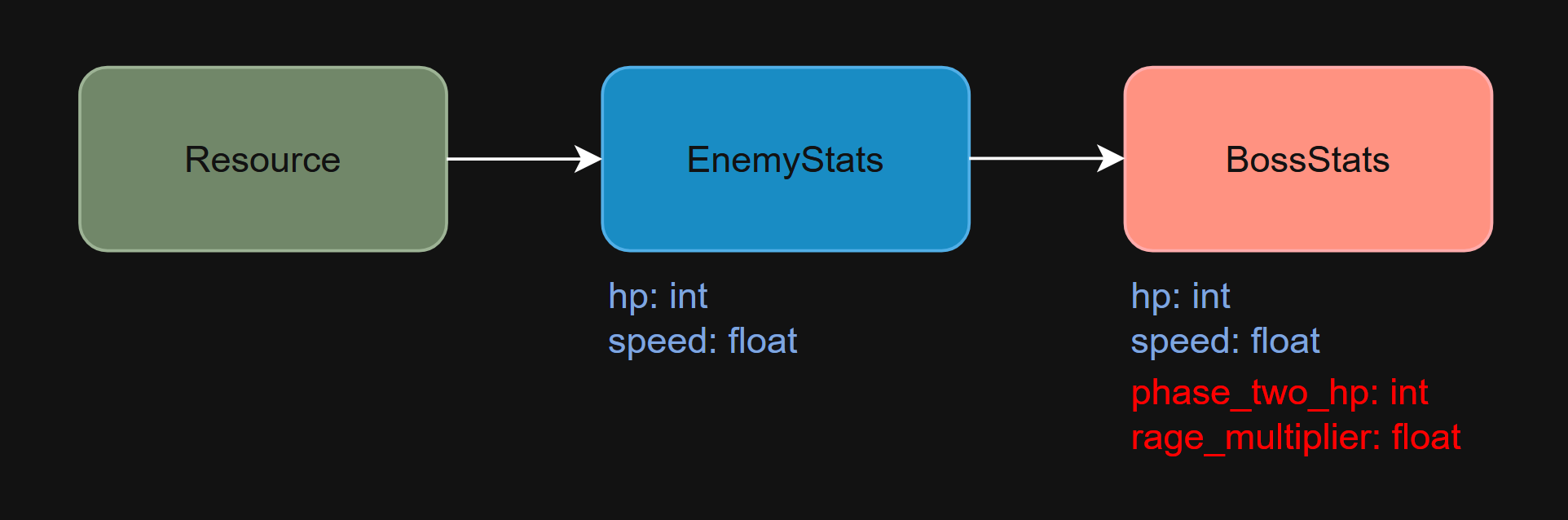
Inheritance - Resources can extend other resources. You can have a base EnemyStats resource, then extend it into BossStats that adds extra fields, all without touching scenes.
# enemy_stats.gd
class_name EnemyStats extends Resource
@export var hp: int
@export var speed: float

# boss_stats.gd
class_name BossStats extends EnemyStats
@export var phase_two_hp: int
@export var rage_multiplier: float
Good video for a summary end example project https://www.youtube.com/watch?v=h5vpjCDNa-w
Credit: Firebelley Games (Coop Tutorial, check it out!)