

hobby-ish gamedev. This website contains my raw notes and documents my progress.
eizenwerk.com
As I was laying on my couch I thought about creating a new, better rememberable name and asked AI for name combinations. In the end i arrived at “EIZENWERK”.
Yes it is german (It is my native language). As you can see it is wrongly written. Eisenwerk in German is a iron manufacturing plant. And as we manufacter games, and I like anime and how they always use german terms and fuck up the spelling. As somewhat of an hommage. Also, i wasnt able to find anything when I googled for it, which means nobody thought of this yet. The .com domain is not taken, the gmail is not taken, the itch and steam username is not taken. perfect. Domain cost only half of the .games domain.
.gif)
coop tutorial - FSM
Todays topic: finite state machines aka FSM We have a boolean check in multiple places is_spawning. Here state machines are useful.
First, before starting the tutorial, lets read up on state machines. I heard of them often enough that they seem kinda important. And I need to learn more than things that interest me personally.
https://www.gdquest.com/tutorial/godot/design-patterns/finite-state-machine/
A FSM is a way to organize code by breaking it down into different states. The machine can only be in one state at a time, with different behaviours for every state.
The most obvious example would be the one of different states for a character. He can be idle, running, jumping, walking, sleeping etc.
There are four conditions for state machines.
- fixed set of states
- machine is in one state at a time
- machine receives events like inputs or signals
- states have transitions mapped to events and transition to the corresponding state based on the event
As you can see not only player inputs can be used to switch between states but also events, like the player being on the floor. Here is a visual example (courtesy of gdquest.com):
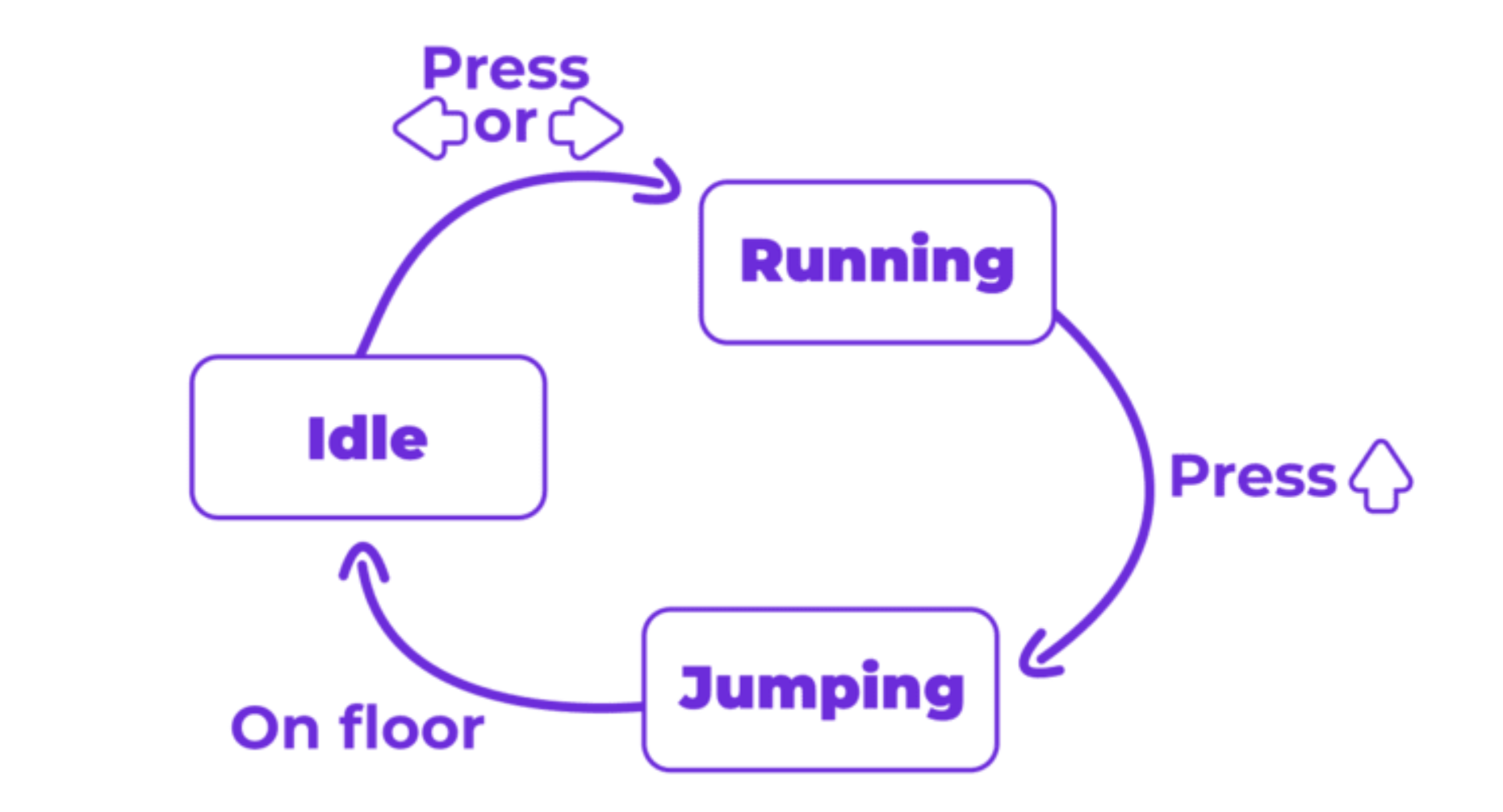
So why would we use FSMs? They solve a very common problem: an object that behaves differently depending on what it is currently doing. So instead of having multiple boolean flags, we replace it with a single variable representing what the object is currently doing.
As only one state can be active at a time, contradictions like is_walking and is_running become impossible. Also, as you exactly define which transitions between states are allowed, unexpected behaviour can be avoided. Like in the visual example, we cant run when we are jumping. But we can run if we are idling. Which we are automatically when we land after jumping and are on the floor.
Imagine if you have multiple states for a character, idle, running and jumping.
extends CharacterBody2D

var is_idle = true
var is_running = false
var is_jumping = false

func _physics_process(delta: float) -> void:
    var input_direction_x := Input.get_axis("move_left", "move_right")

    if (is_idle or is_running) and Input.is_action_just_pressed("move_up"):
        animation_player.play("jump")
        velocity.y = -jump_impulse

        is_idle = false
        is_running = false
        is_jumping = true
    elif is_jumping and is_on_floor():
        is_jumping = false
        if input_direction_x != 0.0:
            is_running = true
            animation_player.play("run")
        else:
            is_idle = true
            animation_player.play("idle")
    elif is_on_floor():
        is_jumping = false
        if input_direction_x != 0.0:
            is_running = true
            is_idle = false
            animation_player.play("run")
        else:
            is_idle = true
            is_running = false
            animation_player.play("idle")
As you can see we only have three states and the script is already bloated and error prone.
Defining states
extends CharacterBody2D

# create enum and list all states
enum States {IDLE, RUNNING, JUMPING,}
# create variable to buffer current state
var state: States = States.IDLE
Use the predefined setter for states to change animations based on the current state
func set_state(new_state: int) -> void:
	# ...
	if state == States.IDLE:
		animation_player.play("idle")
	elif state == States.RUNNING:
		animation_player.play("run")
	elif state == States.JUMPING:
		animation_player.play("jump")
	# ...
Credit: Firebelley Games (Coop Tutorial, check it out!)