hobby-ish gamedev. This website contains my raw notes and documents my progress.
Coop Dungeon p1
I found a tutorial and very fast got ideas about my current game and how I could extend on it. I know this is not best practice, one should overscope etc. But multiplayer was always one of the main focus of mine, I am not very social as I find it tiresome without “purpose”. Like meeting up with work collegues to work on something is easy to me. But socialize with them in the evening and talk about casual stuff? Please save me. But a multiplayer game? You can leave anytime. You can support others.
Now think about a game where you get benefits when you crawl dungeons together (support, more loot) AND you can work on yourself during off times, when no multiplayer is being done. Like building a base and farming and stuff, but special loot is locked behind dungeons and in return the better your base the better your support ability. Like better farming brings better food, which brings better buffs, which allows you to crawl to deeper dungeons. I thought about implementing a market or something for players who only want to do the one or the other. Im not sure about that yet, because games have boundaries and limitations, and I dont want to kill the game or overscope by adapting to every player. That seems dumb. I like the idea of a player driven market though, like selling high drop weapons etc on the auction house.
Well, this is the course: https://www.udemy.com/course/create-a-complete-online-cooperative-multiplayer-game-in-godot-4/
nice to know: Use move_and_slide() within the process function because its frame incosistent when called in the physics_process function under heavy load.
Setup the menu to create or connect to a server
functions that are only called within the script begin with “_”.
Using the MultiplayerAPI from godot to connect to a local server:
extends Control

const PORT: int = 3000


@onready var host_button: Button = $HBoxContainer/HostButton
@onready var join_button: Button = $HBoxContainer/JoinButton

func _ready() -> void:
	host_button.pressed.connect(_on_host_pressed)
	join_button.pressed.connect(_on_join_pressed)
	multiplayer.peer_connected.connect(_on_peer_connected) #sets up a listener. When peer_connected signal is emitted call _on_peer_connected

func _on_host_pressed() -> void:
	var server_peer := ENetMultiplayerPeer.new() # instances the Enet class and stores it in server_peer
	server_peer.create_server(PORT)
	multiplayer.multiplayer_peer = server_peer # Activate the server for Godot's multiplayer system

func _on_join_pressed() -> void:
	var client_peer := ENetMultiplayerPeer.new()
	client_peer.create_client("127.0.0.1", PORT)
	multiplayer.multiplayer_peer = client_peer

func _on_peer_connected(id: int):
	print("my peer id: %s" % multiplayer.get_unique_id())
	print("peer connected %s" % id)
Switching scenes with PackedScene
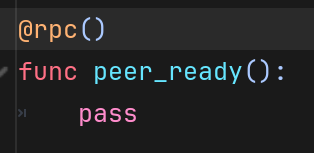
Mark a function as a RPC, so that the function can be called over the network. By default, authority is active and only the host can call the function.
Credit: Firebelley Games (Coop Tutorial, check it out!)